4.1
Free
3uTools
A free all-in-one data management tool

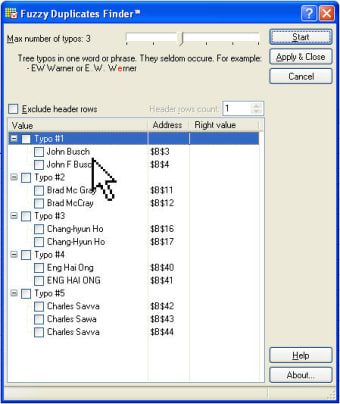
If you have Microsoft Excel worksheets and workbooks with numerous records that probably differ in one or a few characters, try Fuzzy Duplicate Finder for Microsoft Excel to handle them.
With this very handy add-in you can quickly and easily find and remove partial, or fuzzy duplicates, typos, misspelled words and similar records in Microsoft Excel worksheets within a list or a selected range. Fuzzy Duplicates Finder performs a fast search for duplicates that differ in 1 to 6 characters. It also recognizes lost and inserted symbols. You'll be impressed by the results of the duplicate search.
Please note, Fuzzy Duplicates Finder is intended for finding and removing fuzzy Microsoft Excel duplicates, i.e. partial duplicates that differ in one or more symbols, and it cannot be used for finding and deleting absolute duplicates in Microsoft Excel workbooks.
Trial version
1.5
Windows
Windows 2000
English
901
1.22 MB
Have you tried Fuzzy Duplicates Finder for Excel? Be the first to leave your opinion!
Add review
Garmin POI Loader for Custom GPS Data

Automatically turn off or restart your computer

Rearrange items in the task bar by dragging and dropping

Recovery for Publisher fixes damaged PUB

Replace generic icon of image files to the actual image

Enhance the information about your battery

WholeClear MSG to NSF Converter to Migrate MSG Files to Lotus Notes

Efficient Application Launcher for Windows


DeduplicationWizard: Efficient Duplicate File Finder

Efficient Text User Interface for Jujutsu

Efficient Clipboard Management with PasteBar